- Home
- Theatre booking
Theatre booking software for venues that show film and stage
A theatre booking system sells seats for each performance on a live seat map, on your website, in your app and at the box office, and keeps one record of who booked. Filmgrail is theatre booking software for venues where film is part of the programme: plays, concerts and screenings are sold through one website, one checkout and one customer list, at a flat annual price with no per-ticket fees. Rådhus-Teatret and Vega Scene run on it.
Theatres already booking on Filmgrail
Rådhus-Teatret is Kongsvinger's theatre and its cinema. Stage productions and films are booked on the same site, and the audience that comes for a play is the audience the film programme can reach next. Vega Scene in Oslo shows film alongside theatre and stage, all sold through one site and one checkout.
Arts and culture houses that mix stage, concerts and film, such as Elverum Kulturhus and Ørland Kultursenter, are covered on the cultural centre page.
A flat annual price with no per-ticket fee and no share of sales, for performances and screenings alike.
A play, a concert and a film in one basket and one payment, on web and in the app.
A few weeks if we already integrate your box office and payment provider; about a month if we need to add a new one.
What a theatre booking system has to do, and how Filmgrail does it
Seat booking that works on a phone
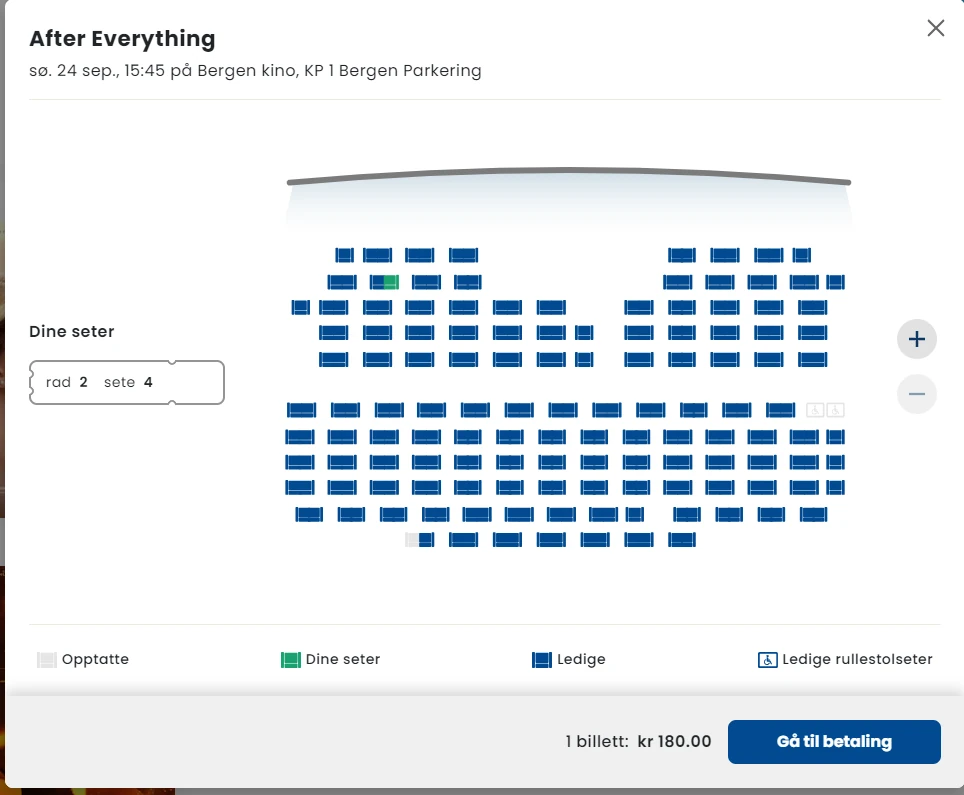
Your own auditorium layout on a live seat map that works with pinch and zoom on a phone, with accessible and companion seats and held blocks for house seats.
Reservations without double bookings
Seats are held while the customer pays and released automatically if they don't, so the web, the app and the counter never sell the same seat twice.
Ticket types and pricing per performance
Adult, concession, student, member, group and premium pricing, set per performance or per run by your own staff, without a support ticket.
One customer list for stage and screen
Each booker has one profile, so you can invite your theatre audience to a screening, and your film audience to opening night, with push and email campaigns.
Your own branded website and app
Every performance and screening is its own page that search engines can read, so people searching for a show in your town find your venue rather than a reseller.
Gift cards and value cards
Sold, stored and redeemed in the same checkout, and carried in the app wallet.
Reporting for the board and funders
Audience, tickets and revenue by production, performance and campaign in Filmgrail Insights. Report formats for a specific funder are available on demand.
You already sell through Spektrix, Ticketsolve or AgileTix
Those connectors are available on demand. We build them during onboarding against your configuration, which takes about a month, and your ticketing system keeps running underneath.
Theatre management software: which kind do you need?
Search for theatre management software or a theatre management system and you will find three unrelated product categories mixed together:
| Category | Manages | Bought by |
|---|---|---|
| Cinema management software | Film programming, ticketing, concessions, marketing, audience data | Cinema exhibitors |
| Performing arts box office | Seasons, performances, memberships, subscriptions, fundraising | Theatres, arts centres, venues |
| Operating theatre management | Surgical scheduling, staffing, lists, clinical resources | Hospitals |
The third is why so many results mention hospitals. If your search returns "theatre management system NHS" or "operation theatre management software", you have crossed into healthcare and none of it applies to a venue.
There is also a fourth, narrower meaning specific to exhibition: in cinema engineering, a TMS or theatre management system is the system that controls digital projection and screen automation — playlists, ingest, scheduling of the actual playback. That is a projection-booth product, not a business platform, and it is not what most people searching the phrase are looking for.
For a venue, the choice that costs money to get wrong is cinema versus performing arts. A cinema runs a weekly grid of the same titles across halls and owes distributors admissions reporting. A theatre runs productions with runs, on-sale dates, subscriptions and fundraising. A venue that does both has three options:
- An arts box office with film bolted on. Works if film is a small part of the programme; distributor reporting will be manual.
- A cinema system with stage events bolted on. Works if film dominates; subscriptions and memberships will be weaker.
- One shared website, app and checkout in front of both. The audience sees one venue, whichever internal system holds the seat. This is how most mixed venues settle, and it is what Filmgrail does.
Honest fit: if you run a producing theatre with no film at all, and your priorities are subscription seasons and donor fundraising, a dedicated performing-arts system is built for that. Filmgrail is the better fit when film is part of your programme or when the immediate problem is the online booking rather than the counter.
See your venue on Filmgrail
See your own venue on Filmgrail in 20 seconds: the prototype tool reads your current website and builds a working version of it, with a back office you can click through. Then book a demo. Prices are on the pricing page.
Comparing systems? Read Filmgrail vs Spektrix, Spektrix alternatives, Ticketsolve alternatives and AgileTix alternatives, or see how box office software and cinema ticketing software fit together.
Frequently asked questions
What is a theatre booking system?
A theatre booking system sells seats for each performance on a live seat map, takes payment, issues tickets and records who booked. Good ones sell on the venue's own website, app and box office against one inventory, so a seat can never be sold twice.
What is the best theatre booking software?
It depends on your programme. Producing theatres focused on subscriptions and fundraising are best served by a performing-arts system. Venues that also show film, or whose main problem is online booking, are better served by Filmgrail: one website, app and checkout for stage and screen, with no per-ticket fees.
Does Filmgrail have theatre seat booking?
Yes. Customers pick seats on the venue's own auditorium layout, on a phone or a desktop, including accessible and companion seats. Seats are held while the customer pays and released automatically if the payment isn't completed.
How much does theatre booking software cost?
Most vendors charge a platform fee plus a per-ticket or percentage fee. Filmgrail charges a flat annual price with no per-ticket fee and no share of sales. Card fees go to your own payment provider.
What is theatre management software?
The phrase covers three unrelated categories: performing-arts box office systems for theatres and arts venues, cinema management software for film exhibitors, and operating-theatre software used by hospitals. In cinema engineering, a TMS is also the system that controls digital projection.
Is a theatre management system the same as a TMS in a cinema?
No. In a cinema, the TMS controls digital projection and screen automation: ingest, playlists and playback. It is a projection-booth product, unrelated to the platform that sells tickets and runs the website.
We use Spektrix, Ticketsolve or AgileTix. Can we keep it?
Yes. Those connectors are available on demand. We build them during onboarding against your configuration, which takes about a month, and your ticketing system keeps running underneath.
Do I need to replace my box office system to improve online bookings?
Usually not. If the problem is the online booking rather than the counter, a digital booking layer in front of your existing box office fixes it without migrating years of inventory, membership and reporting history.
You do not have to replace your box office
Filmgrail reads your programme, seat maps, ticket types and pricing from the system you already run, and writes the completed sale back so your reporting stays whole.
Vista
Keep Vista as the back office and settlement engine. Replace the website, the apps and the online checkout…
Vista GroupVeezi
Veezi runs the cinema well and cheaply. Its web sales page is the weakest thing an independent shows its…
POSitivePOSitive
POSitive keeps the counter, the inventory and the reporting. Filmgrail takes the website, the native apps and…
Admit One ProductsAdmit One
Admit One already sits across several POS systems. Filmgrail adds the branded website, native apps and…
MyCloudCinemaMyCloudCinema
A cloud box office deserves a cloud front end. Keep MyCloudCinema for operations and put a branded site…
COMPESOCOMPESO
COMPESO is deeply established in German-speaking exhibition. Filmgrail adds the branded digital layer above…
Further reading
Best Movie Theater Software in 2026: 21 Cinema Ticketing Systems Compared
The best movie theater and cinema ticketing software in 2026: 21 systems checked on each vendor's site, with published…
Cinema ticketing & bookingCinema Booking Software: Features, Costs and How to Choose
Cinema booking software compared: the features that sell seats, what it costs, and how to choose a movie ticket booking…
Cinema ticketing & bookingCinema Ticket APIs and Movie Ticket Reservation API Providers
How movie ticket reservation APIs expose showtimes, seats, pricing and orders, the main cinema ticket API providers…
Cinema ticketing & bookingCinema POS and Movie Theater POS Systems: A Buyer's Guide
What a cinema POS does, how movie theater POS systems handle tickets and concessions, the best options for independent…
Cinema ticketing & bookingBest Interactive Seat Selection Tools for Cinemas
Explore the best interactive seat selection tools for cinemas that enhance ticket booking, boost sales, and improve…
Cinema ticketing & bookingDigital Ticketing for Cinemas: Key Advantages
What a digital ticketing system does for a cinema: fewer queues, lower costs, better customer data, and how to switch…