- Home
- Box office software
Box office software built around the online sale
Box office software sells seats at the counter, on the web and in the app against one live inventory, and reports what sold. Filmgrail is online box office software for cinemas: it sells tickets on your website and app and writes every sale back to your counter system, whether that is Vista, Veezi, Admit One, Compeso, RTS or another, for a flat price per screen with no per-ticket fees. Most box office systems were designed for a counter and grew a website later. Filmgrail is the other way round.
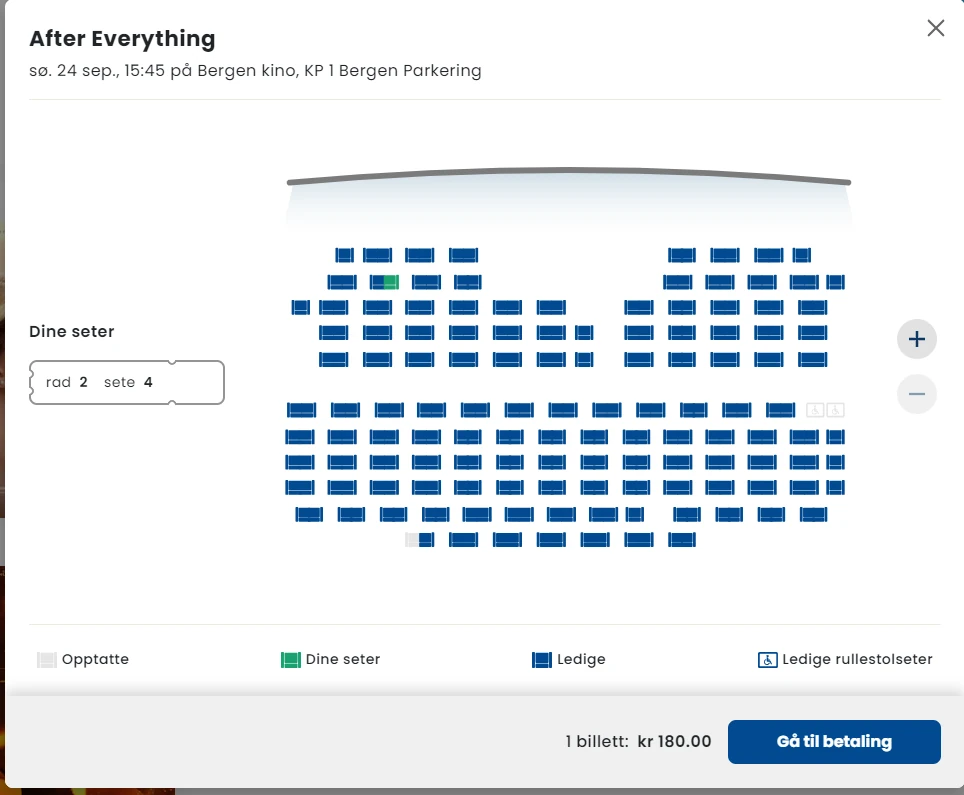
What "box office software" has to cover
The phrase covers three jobs that used to be three products:
- Inventory and pricing. Halls, seats, screenings, ticket types, pricing rules, holds and comps.
- Selling. At the counter, on a kiosk, on the website and in the apps — against one shared inventory, in real time.
- Reporting. What sold, through which channel, at which price, to whom, and what it settled to.
A cinema gets into trouble when those three live in different systems. Two selling channels against two inventories produce oversells; two pricing tables produce a refund queue; two reporting systems produce a number nobody trusts.
Filmgrail solves this by not duplicating the inventory. It reads and writes your existing box office through its API, and owns the part most counter-first systems do worst: the online sale.
The digital box office layer
One inventory, every channel
Web, iOS, Android and your counter system sell the same seats against the same live availability. No reconciliation, no oversells.
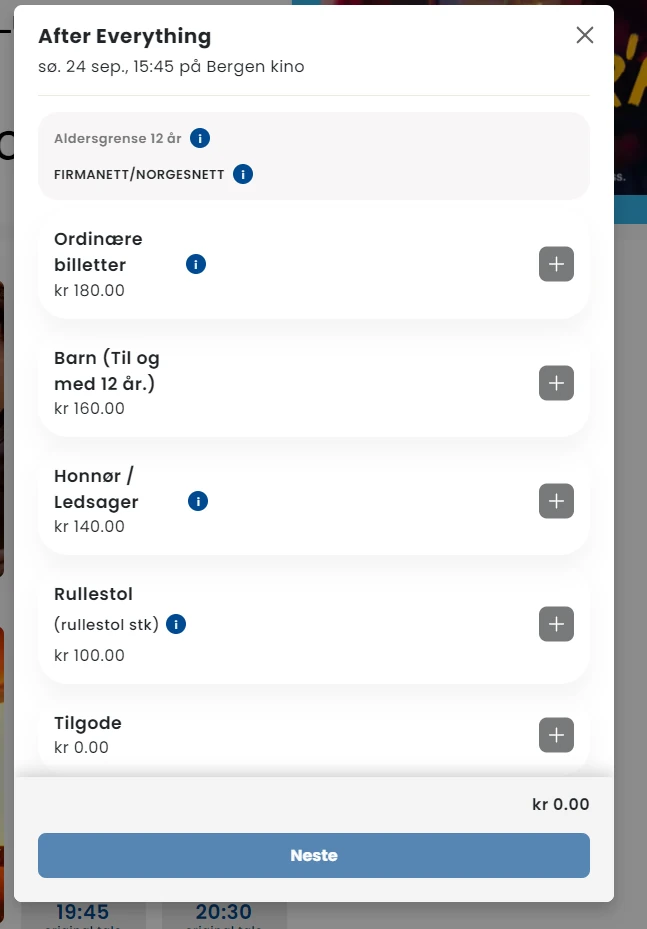
Ticket types and pricing rules
Adult, child, student, member, matinee, premium format, per-hall and per-location pricing — editable by your own staff without a release.
Seat maps that work on a phone
Real hall layouts with pinch, pan and tap, plus accessible seats, companion seating and held blocks.
Gift cards and value cards
Sold, stored and redeemed in the same checkout and carried in the app wallet.
Reporting you can act on
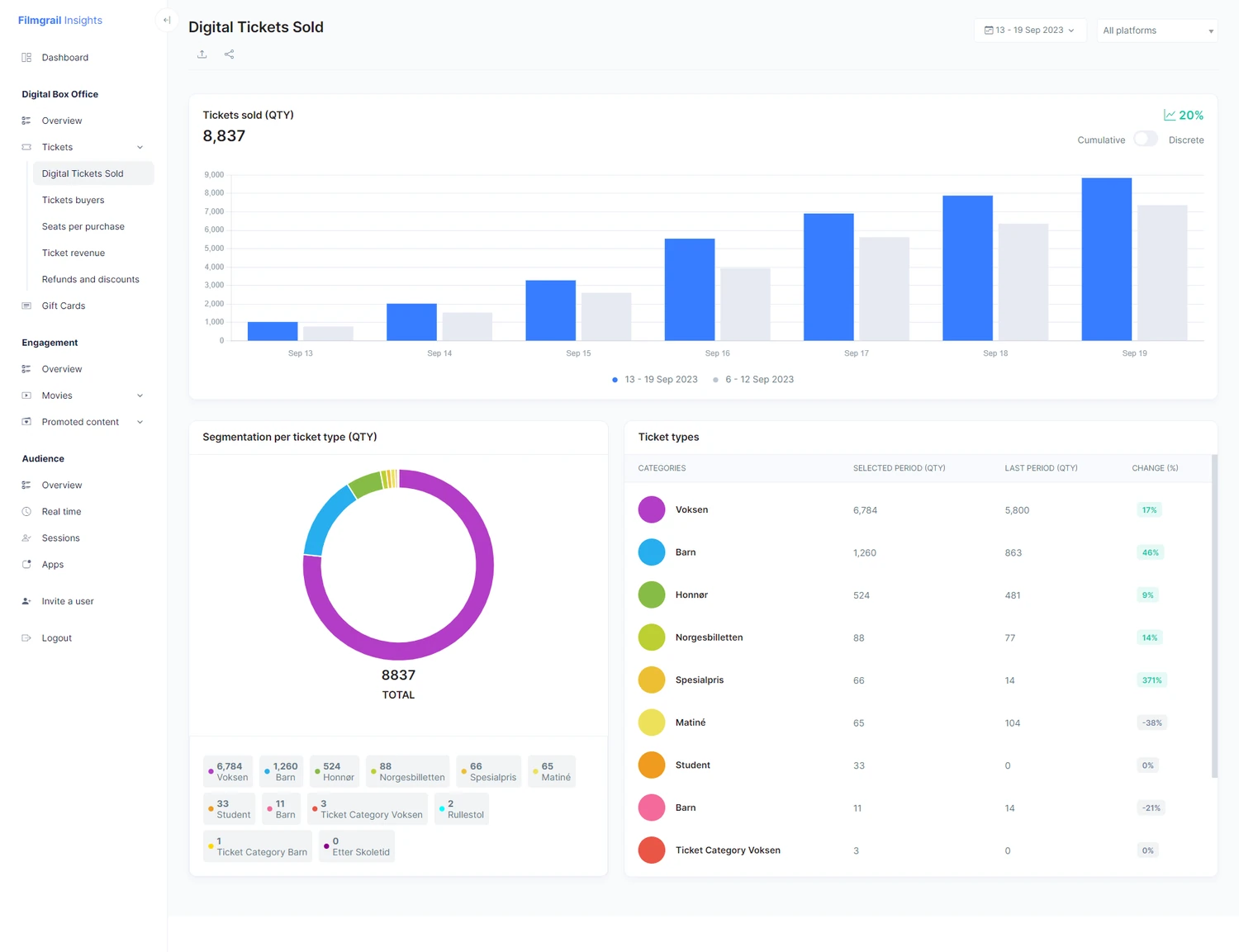
Digital box office by film, screening, channel and location, with the buyer attached rather than an anonymous transaction.
Integrations, not replacement
Filmgrail maps onto your existing box office, payment and loyalty providers rather than forcing a rip-and-replace.
Box office software, box office management system or ticketing system?
Vendors use the three names for the same job: a box office management system holds halls, seats, screenings and pricing; a box office ticketing system sells and issues the tickets; online box office software is the part that sells on the web and in the app. Buyers searching for any of them usually need all three to share one inventory.
The market splits into four groups, and most disappointment comes from buying from the wrong group rather than from buying a bad product:
| Segment | Built for | Strength | Usual weakness |
|---|---|---|---|
| Enterprise cinema platforms | Chains and circuits | Deep scheduling, distributor reporting, multi-site control | Cost and change latency; online experience often dated |
| Independent cinema platforms | Single sites and small groups | Cloud, fast to deploy, priced for small operations | Less configurable; fewer integrations |
| Performing-arts box office | Theatres, arts centres, venues | CRM, memberships, fundraising, reserved seating | Not built around continuous film programming |
| Digital-first layers | Online and mobile selling | Conversion, apps, customer identity | Do not run the counter; must integrate |
Names you will meet while researching include Vista and its independent-focused product Veezi, POSitive, RTS and Omniterm on the cinema side, and Spektrix and Ticketsolve on the performing-arts side. The Boxoffice Company sells an online layer that integrates with several of the cinema systems. Filmgrail sits in the fourth group: it provides the digital ticketing layer and integrates with whatever runs your counter.
A cultural centre running film four nights a week and live performance the rest often needs a performing-arts system, not a cinema one. A six-screen independent usually does not need an enterprise platform. Getting the segment right removes most of the shortlist.
How to choose box office software: eleven questions to ask every vendor
Selling
- What is the mobile conversion rate across your customer base? If the vendor cannot answer, they are not measuring the thing that matters most. Over two thirds of cinema traffic is a phone.
- Can I complete a booking without creating an account? A forced registration step before payment is the most expensive single design decision in cinema ticketing.
- Show me the seat map on a real phone. Pinch, pan, select an accessible seat, change your mind.
- How many taps from the homepage to a completed purchase? Count them yourself during the demo.
Control
- Can my own staff change a price, add a ticket type or run a promotion? If any of those is a support ticket, you will stop doing them.
- What can be configured per hall and per screening rather than per site? Premium formats and event cinema depend on it.
- How do refunds, exchanges and comps work? Ask to see the flow, not the feature bullet.
Data and integration
- Is there a documented API you can read and write against? See the documentation before signature.
- Who owns the customer data, and can I export it in full? Get the answer in the contract.
- Which showtime aggregators do you supply, and how often? This decides whether your showtimes appear correctly on Google.
- What happens to my data if I leave? Export format, notice period, and whether historical transactions come with you.
Then run the evaluation the practical way: write down your constraints (screens, sites, country, hardware, live events), shortlist three vendors by segment, demo with your own programme rather than the vendor's sample data, buy a ticket yourself on a phone on each shortlisted system, and get the three-year total in writing including payment processing and exit terms. With Filmgrail you can skip the sample data entirely: build a working prototype of your own cinema in 20 seconds.
What box office software really costs
Platform fees and per-ticket fees are the visible part. The costs that decide the real total are usually elsewhere:
- Payment processing, sometimes bundled and sometimes not; over a year of volume the difference is often larger than the licence.
- Migration of seat inventory, memberships, gift card balances and reporting history.
- Integrations to loyalty, accounting or data partners, often quoted one by one.
- Change requests: anything your staff cannot do themselves becomes billable forever.
- Training: a system that takes two days to learn is expensive in a business with seasonal staff.
"Free" box office software usually means a booking fee charged to your customer, a tier you will outgrow, or an unsupported open-source project. A customer-facing booking fee still comes out of your conversion rate and your attendance.
Filmgrail costs a flat $200 to $20,000 a year depending on screens, with no per-ticket fee and no share of sales. See pricing.
Counter-first or digital-first
Established cinema box office platforms — Vista, Veezi, POSitive, RTS, Omniterm and others — are strong at the counter, at scheduling and at back-office reporting. That is what they were built for.
Where cinemas consistently lose money is the online path: a seat map that fails on mobile, a forced account step before purchase, ticket types nobody can decode, and a payment screen that asks for a card the customer has already saved.
Filmgrail is designed for exactly that path, and integrates with the counter system rather than competing with it. Cinemas on the platform see an average 89% yearly increase in digital ticket sales.
of end users create a profile, so a box office sale becomes a moviegoer you can reach again.
more engagement than benchmarks for standard ticketing sites and apps.
average yearly increase in digital ticket sales across cinemas on the platform.
Frequently asked questions
What is box office software?
Box office software manages the sale of seats for screenings or performances. It holds the venue layout and seat inventory, applies ticket types and pricing rules, takes payment, issues tickets and reports on what sold. In cinemas it usually splits into a counter/POS layer in the building and a digital layer on web and mobile.
What is the difference between box office software and a ticketing system?
In practice the terms are used interchangeably. Where a distinction is drawn, "box office" tends to describe the whole selling and reporting operation including the counter, while "ticketing system" describes the engine that holds seat inventory and issues tickets. Filmgrail provides the digital selling layer on top of whichever engine you run.
Do I have to migrate off my current box office to use this?
No. Filmgrail reads and writes your existing box office through its API rather than duplicating the seat inventory, so the counter system, its scheduling and its distributor reporting all stay where they are. What changes is the online selling experience in front of it.
How is box office software priced?
Usually as a quote: a platform fee plus a per-ticket or percentage transaction fee, scaled to screen count and volume. Filmgrail's digital layer is the exception, a flat $200 to $20,000 a year by screens with no per-ticket fee. Payment processing, migration and per-integration charges often matter more to the three-year total than the licence itself. Filmgrail provides a free personalised cost assessment and a three-year ROI estimate for your cinema.
Can one system run several cinemas?
Yes. Multi-site chains run one platform with per-location halls, pricing, ticket types and programmes, plus consolidated reporting across every site.
What is the best box office software for a cinema?
It depends on the segment you are in. Chains usually need an enterprise cinema platform, independents a cloud cinema platform, mixed-programme venues a performing-arts system, and almost every cinema benefits from a digital-first layer for online sales. For the online sale itself, Filmgrail works on top of Vista, Veezi, Admit One, Compeso, RTS and others, for a flat price per screen with no per-ticket fees.
Is free box office software worth using?
It can be, but price it honestly. Free usually means a booking fee charged to your customer, a limited tier you will outgrow, or an unsupported open-source project. A booking fee on the customer still comes out of conversion and attendance.
Should I replace my whole box office system to fix online sales?
Often not. Counter-first systems are usually strong at scheduling, reporting and the till, and weakest at the mobile purchase. A digital selling layer in front of the box office you already run fixes the conversion problem without migrating years of inventory, memberships and reporting.
What is the difference between box office software and cinema management software?
Box office software sells seats: inventory, pricing, payment, ticket issue and sales reporting. Cinema management software is broader and usually also covers programming and scheduling, the website and app, marketing, loyalty and audience analytics. See cinema management software for the wider picture.
How long does it take to go live?
A few weeks when we already integrate your box office and payment provider; about a month when we need to build a new integration.
You do not have to replace your box office
Filmgrail reads your programme, seat maps, ticket types and pricing from the system you already run, and writes the completed sale back so your reporting stays whole.
Vista
Keep Vista as the back office and settlement engine. Replace the website, the apps and the online checkout…
Vista GroupVeezi
Veezi runs the cinema well and cheaply. Its web sales page is the weakest thing an independent shows its…
POSitivePOSitive
POSitive keeps the counter, the inventory and the reporting. Filmgrail takes the website, the native apps and…
Admit One ProductsAdmit One
Admit One already sits across several POS systems. Filmgrail adds the branded website, native apps and…
MyCloudCinemaMyCloudCinema
A cloud box office deserves a cloud front end. Keep MyCloudCinema for operations and put a branded site…
COMPESOCOMPESO
COMPESO is deeply established in German-speaking exhibition. Filmgrail adds the branded digital layer above…
Further reading
Best Movie Theater Software in 2026: 21 Cinema Ticketing Systems Compared
The best movie theater and cinema ticketing software in 2026: 21 systems checked on each vendor's site, with published…
Cinema ticketing & bookingCinema Booking Software: Features, Costs and How to Choose
Cinema booking software compared: the features that sell seats, what it costs, and how to choose a movie ticket booking…
Cinema ticketing & bookingCinema Ticket APIs and Movie Ticket Reservation API Providers
How movie ticket reservation APIs expose showtimes, seats, pricing and orders, the main cinema ticket API providers…
Cinema ticketing & bookingCinema POS and Movie Theater POS Systems: A Buyer's Guide
What a cinema POS does, how movie theater POS systems handle tickets and concessions, the best options for independent…
Cinema ticketing & bookingBest Interactive Seat Selection Tools for Cinemas
Explore the best interactive seat selection tools for cinemas that enhance ticket booking, boost sales, and improve…
Cinema ticketing & bookingDigital Ticketing for Cinemas: Key Advantages
What a digital ticketing system does for a cinema: fewer queues, lower costs, better customer data, and how to switch…